Got IT issues slowing you down? We provide both on-site and remote support across Australia, so help is never far away.
Managing contractor logins is one of the most common — and most dangerous — access control problems facing Australian SMBs. Contractors need access quickly so work can begin, but speed often comes at the expense of security. Passwords get shared, accounts are over-provisioned, and access is rarely removed on time.
The result is digital access sprawl. Accounts remain active long after a contract ends, creating silent security gaps that are easy to overlook and hard to defend.
This is where digital access management becomes critical. With the right approach, you can grant contractors precise access, enforce strong authentication, and revoke everything automatically when the work is done — without adding operational overhead.
Using Microsoft Entra Conditional Access, SMBs can build a self-cleaning contractor access system in under an hour. The outcome is stronger security, simpler management, and far less reliance on memory or manual cleanup.
Contractors sit in a unique security category. They are trusted enough to access systems, but they are not employees. They use personal devices, work across multiple clients, and often come and go quickly.
Without strong user access control, contractor accounts introduce several risks:
• Shared or reused credentials
• Excessive permissions granted “just in case”
• No clear offboarding process
• Accounts forgotten after project completion
These issues are rarely visible day to day, but they accumulate over time. Each unused login quietly expands your attack surface.
From an identity security perspective, unmanaged contractor access is one of the easiest ways attackers gain a foothold inside business systems.
Automated access revocation is not just about good security hygiene. It is a core requirement for financial risk management and compliance.
The biggest weakness in contractor management is relying on people to remember to remove access. When accounts are left active, they become dormant or “ghost” accounts — a prime target for attackers because no one is monitoring them.
If a dormant contractor account is compromised, attackers can operate under a legitimate identity, often bypassing alerts designed to detect unusual behaviour.
A well-known example frequently cited in security discussions is the Target data breach. Attackers gained initial access through a third-party contractor whose credentials allowed more access than required. Once inside, they moved laterally through the network and compromised millions of customer records.
While SMBs operate at a different scale, the principle is exactly the same. Excess access plus forgotten accounts equals risk.
By using Microsoft Entra Conditional Access to automate revocation when a contractor is removed from a security group, you eliminate the possibility of lingering access. This enforces least privilege access consistently and provides clear evidence of due diligence for auditors and regulators.
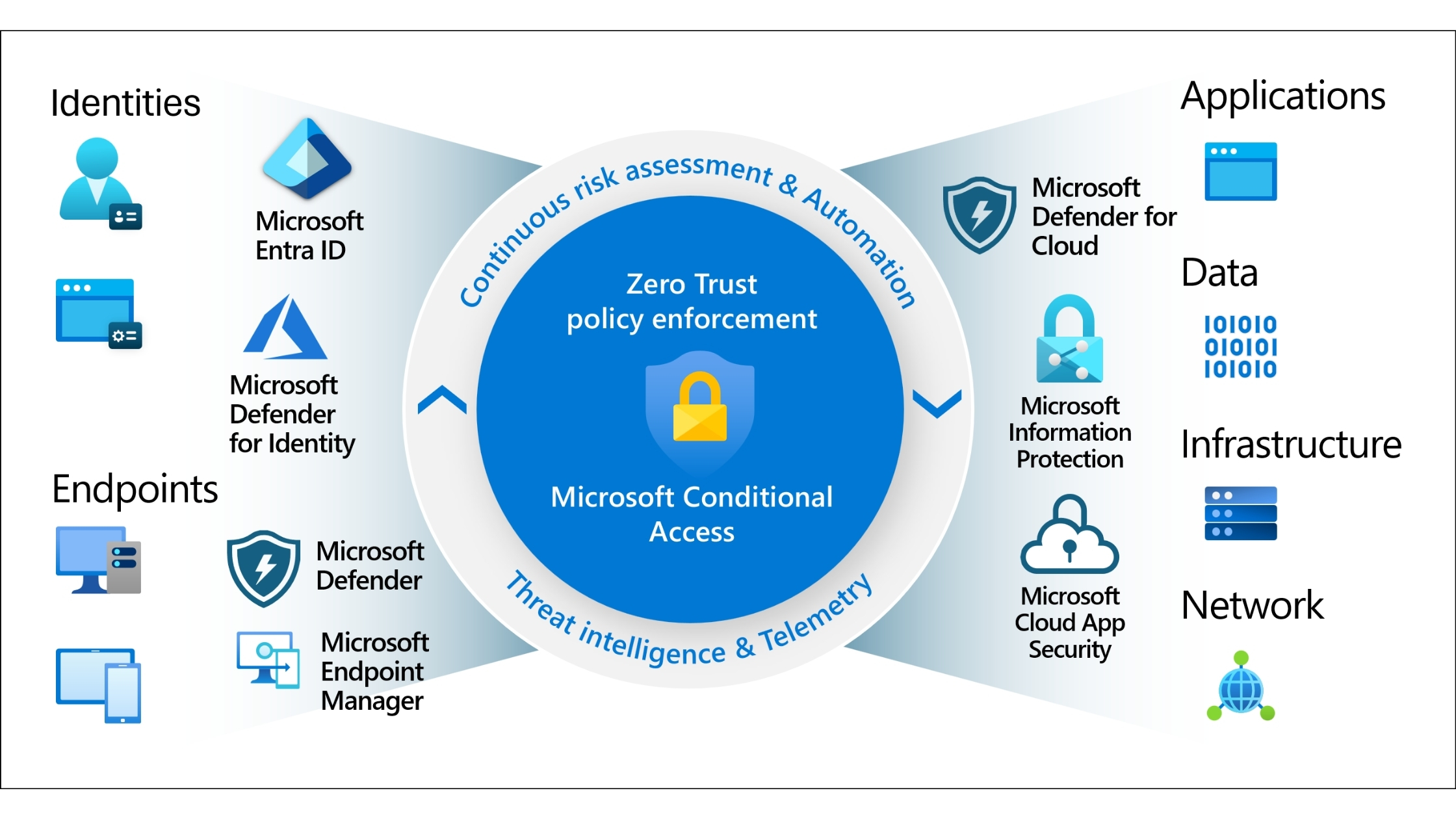
Microsoft Entra Conditional Access is particularly effective for SMEs because it combines identity, access control, and automation in one platform.
Instead of managing permissions manually across multiple applications, Conditional Access allows you to define rules that apply automatically based on:
• User or group membership
• Applications being accessed
• Authentication strength
• Session conditions
For contractor management, this means access is controlled centrally and removed instantly when conditions change.
The foundation of clean contractor access management is organisation.
Instead of managing permissions per user, create a dedicated security group in the Microsoft Entra admin centre. Use a clear, descriptive name such as:
External-Contractors
Temporary-Access
Project-Contractors
This group becomes your single control point. Every contractor is added when they start and removed when their engagement ends.
This approach ensures consistency, reduces administrative effort, and prevents access from being scattered across individual accounts.
Once your contractor group exists, Conditional Access handles the rest.
Create a Conditional Access policy that applies specifically to your contractor security group. In the policy configuration:
• Require Multi-Factor Authentication
• Set a sign-in frequency aligned with contract length
• Apply session controls to prevent persistent access
Sign-in frequency is particularly powerful. When a contractor is removed from the group, they cannot re-authenticate, and any existing sessions are terminated.
This turns access revocation into an automatic process rather than a manual checklist item.
Not every contractor needs access to everything.
A writer may need SharePoint and Teams. A developer may need a staging environment. Very few contractors need access to finance, HR, or administration systems.
Create a second Conditional Access policy for contractors that explicitly defines which cloud apps they can access. Allow only the tools required for their role and block everything else.
This enforces least privilege access by default and significantly reduces blast radius if an account is compromised.
Contractors typically use personal devices, and that is fine. Device ownership does not need to be a barrier to strong identity security.
Microsoft Entra allows you to require stronger authentication methods even when devices are unmanaged. You can configure policies that allow access only when:
• MFA is completed using approved methods
• Phishing-resistant authentication is used
• Risky sign-ins are blocked automatically
This ensures that even if credentials are stolen, attackers cannot easily reuse them.
Once configured, contractor access becomes largely hands-off.
When a contractor is added to the group, access is provisioned instantly with all required security controls. When they are removed, access is revoked immediately across all systems.
There is no need to chase checklists, remember deadlines, or audit individual accounts manually. The system enforces your rules consistently every time.
This is the real value of modern digital access management — fewer mistakes, less effort, and stronger security outcomes.
For SMBs, the most effective approach is structured and repeatable.
Start by identifying all systems contractors currently access. Group them into required and non-required categories.
Create a standard onboarding process that includes:
• Adding contractors to the correct security group
• Assigning application access via policy
• Enforcing MFA and session controls
Equally important is offboarding. Removing a contractor from the group should be the only step required to fully revoke access.
This blueprint ensures contractor access management scales cleanly as your business grows.
.jpg)
• Never share passwords with contractors
• Avoid assigning permanent licences when temporary access is sufficient
• Use security groups instead of individual permissions
• Review contractor access regularly
• Align access policies with contract duration
• Treat contractor identities as high-risk by default
Challenge 1: Contractors retain access after projects end
BIT365 Solution: Use Entra security groups with Conditional Access so access is revoked automatically when contractors are removed.
Challenge 2: Over-provisioned access increases breach impact
BIT365 Solution: Apply least privilege access by restricting contractors to only required applications.
Challenge 3: Manual access management does not scale
BIT365 Solution: Automate access provisioning and revocation using Conditional Access policies.
Challenge 4: Weak authentication on contractor accounts
BIT365 Solution: Enforce strong MFA and phishing-resistant authentication for all contractor sign-ins.
• Contractor access is a major security risk if unmanaged
• Digital access management reduces reliance on memory and manual tasks
• Microsoft Entra Conditional Access enables automated revocation
• Least privilege access limits damage from compromised accounts
• Strong authentication protects unmanaged devices
• Automation improves security while reducing workload
🌐 Cyber Insurance for Small Business: What's Really Covered (And What's Not)
🌐 Gmail Security in 2025: How to Stay Ahead of AI-Powered Threats
🌐 7 Unexpected Ways Hackers Can Access Your Accounts
Managing contractor access does not have to be stressful or risky. With the right Conditional Access setup, you can create a secure, automated system that works quietly in the background.
BIT365 helps Australian SMBs design identity-first security frameworks that simplify access management while reducing risk. If you are ready to regain control of contractor access and close hidden security gaps, speak with BIT365 today.
Got IT issues slowing you down? We provide both on-site and remote support across Australia, so help is never far away.
BIT365 offers a full range of managed IT services, including cybersecurity, cloud solutions, Microsoft 365 support, data backup, and on-site or remote tech support for businesses across Australia.
No. While we have a strong presence in Sydney, BIT365 supports businesses nationwide — delivering reliable IT solutions both remotely and on-site.
We pride ourselves on fast response times. With remote access tools and on-site technicians, BIT365 can often resolve issues the same day, keeping your business running smoothly.
BIT365 combines local expertise with enterprise-grade solutions. We’re proactive, not just reactive — preventing issues before they impact your business. Plus, our friendly team explains IT in plain English, so you always know what’s happening.


%20Best%20Practices%20(1).jpg)
.jpg)
.jpg)

.jpg)

.jpg)

.jpg)

.jpg)






.jpg)



%20(3).jpg)





.jpg)












.jpg)