Smarter Guest Wi-Fi Security for Modern Businesses

Book an Expert

Got IT issues slowing you down? We provide both on-site and remote support across Australia, so help is never far away.

Guest Wi-Fi is a convenience your visitors expect and a hallmark of good customer service. Whether customers are buying coffee, meeting with your team, or checking in for an appointment, providing internet access feels like part of running a professional business. But the convenience of a shared network comes with risks far beyond slow speeds or annoyed users. In fact, an unsecured guest network can be one of the riskiest entry points into your broader IT systems, exposing you to malware, lateral attacks, and data breaches.

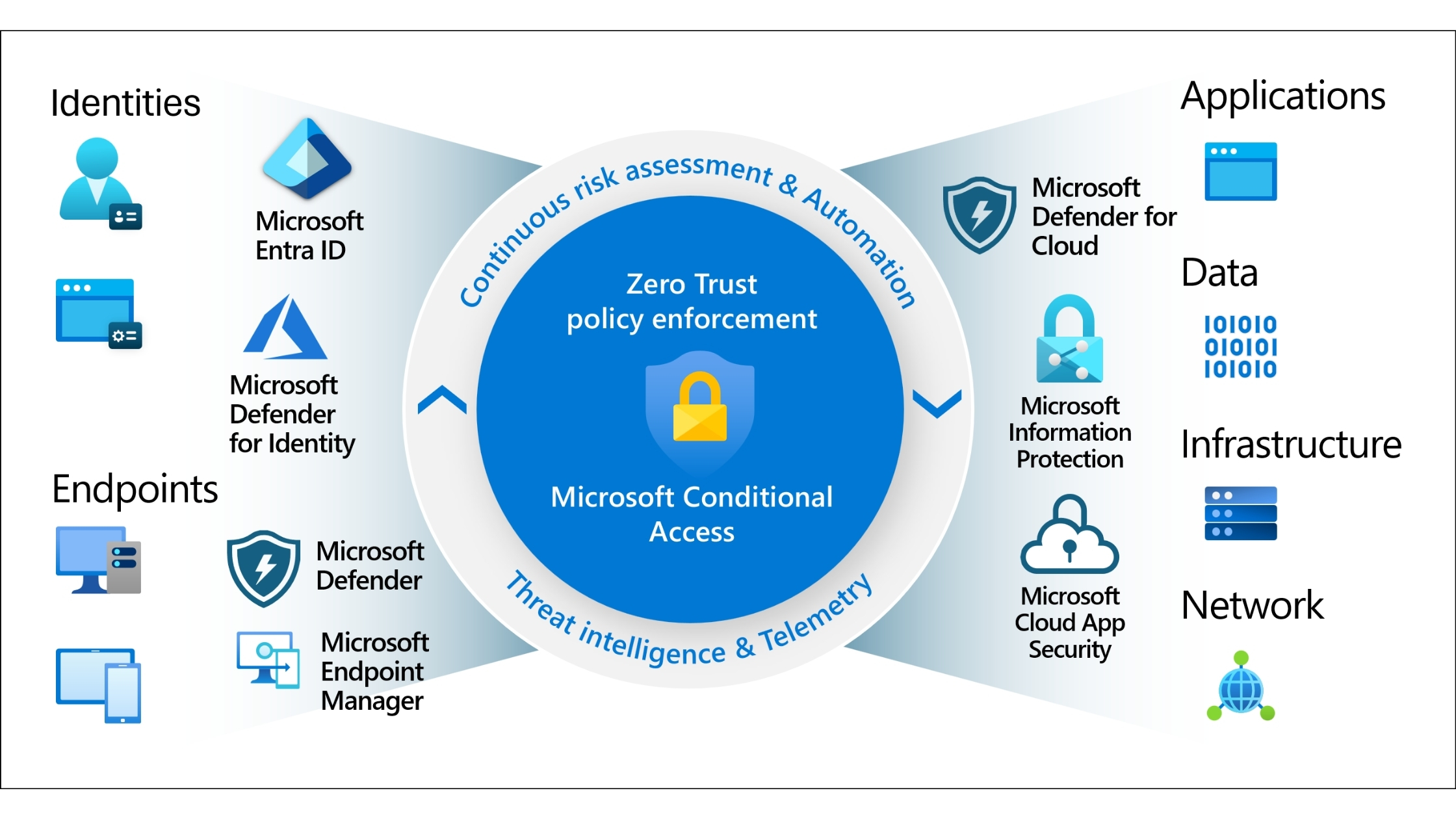
For Australian SMBs, taking a Zero Trust approach to guest Wi-Fi is no longer optional — it’s essential. The core principle is simple but powerful: never trust, always verify. No device or user should gain unrestricted access just because they are on your guest network. In this blog, we explore how Zero Trust guest Wi-Fi strengthens security, supports business continuity, and enhances customer experience without unnecessary complexity.

We’ll explain what Zero Trust means in the context of guest Wi-Fi, how to build a completely isolated network, how to enforce access policies, and actionable steps that any SMB can implement to protect people and systems in 2025 and beyond.

Why Your Business Needs Zero Trust Guest Wi-Fi

Providing Wi-Fi to guests is about more than good service — it reflects your digital maturity and commitment to customer safety. Traditional guest networks often rely on shared passwords that never change, are printed on signs or handouts, and are reused indefinitely. These passwords are easily shared, hard to revoke, and offer little to no protection. Worse, a guest device infected with malware can act as a beachhead, giving attackers a foothold inside your network.

A Zero Trust guest Wi-Fi strategy removes implicit trust from the network. Instead of granting instant access to anything and everything, every connection is treated as potentially hostile until proven otherwise. This prevents unauthorised lateral movement into corporate systems and greatly reduces the risk of common network attacks.

The business benefits go beyond security. A professionally configured guest network:

  • Protects your reputation by demonstrating a commitment to safety
  • Minimises potential downtime from network incidents
  • Reduces compliance risk, especially for businesses handling personal or customer data
  • Improves performance by isolating guest traffic from business workloads

When implemented correctly, Zero Trust guest Wi-Fi provides both security assurance and a streamlined, user-friendly experience for visitors.

The Business Case: Security and Operational Benefits

Implementing Zero Trust for guest Wi-Fi is not just a technical necessity; it is a strategic decision that delivers real business advantages.

First, security incidents are costly. A single compromised guest device has the potential to pivot from guest access to internal infrastructure and cause:

  • Extended downtime
  • Data breaches
  • Loss of customer trust
  • Remediation costs in the tens or hundreds of thousands of dollars

Back in 2018, Marriot International experienced a high-profile data breach traced back through third-party access points. While not directly caused by guest Wi-Fi, the incident illustrates how insecure entry points — even those that seem insignificant — can be exploited to access sensitive customer data. A Zero Trust guest network, with strict isolation and verification, would significantly reduce this type of lateral movement.

For SMBs, this means not only safeguarding your systems but also protecting business continuity and competitive advantage in a market where trust and reliability matter.

Build a Totally Isolated Guest Network

The foundation of a secure guest Wi-Fi setup is complete network separation. Your guest network must be fully isolated from corporate resources, internal file shares, printers, and systems containing sensitive data. This is achieved through strong network segmentation.

Use a Dedicated VLAN for Guest Traffic

Create a separate Virtual Local Area Network (VLAN) just for guest access. This VLAN should:

  • Use its own unique IP range
  • Be logically isolated from your corporate network
  • Only have routes to the public internet

This segmentation ensures that even if a guest device is compromised, it cannot access your internal systems directly.

Configure Explicit Firewall Rules

Once your guest VLAN is created, set up your firewall so that:

  • Guest VLAN cannot communicate with corporate VLANs
  • The only allowed destination is external internet traffic
  • Any attempt to reach internal resources is blocked and logged

This strategic containment is central to Zero Trust — assuming that no connection is trustworthy until verified.

Implement a Professional Captive Portal

Static Wi-Fi passwords are antiquated and insecure. Instead, Zero Trust guest Wi-Fi relies on a professional captive portal, similar to what customers see when they log into hotel or airport Wi-Fi.

This portal serves as an interactive entry point, presenting visitors with a branded login page that:

  • Collects minimal identity information
  • Issues unique, time-bound credentials
  • Supports secure verification methods

Here are practical ways to configure your captive portal:

Unique Temporary Codes

A receptionist or front-desk staff member can generate a unique access code that expires within a set time frame — for example, 8 hours or 24 hours. This limits how long a device can remain connected, and the login can be revoked at any time.

Self-Registration with Verification

Visitors can provide a name and email address to receive a one-time code. This method ties access to a specific user action and allows your business to track usage patterns without exposing internal systems.

One-Time Password by SMS

For higher assurance, require visitors to enter a mobile number and send a time-limited code via SMS. This adds an extra layer of verification and ensures that access is tied to a unique device.

By using a captive portal, you turn anonymous connections into authenticated sessions where time-bound access can be managed, revoked, and logged.

Enforce Policies via Network Access Control

A captive portal is an important first step, but to achieve true guest network security, you need deeper enforcement. This is where Network Access Control (NAC) becomes invaluable.

NAC solutions act like a security bouncer — they check every device before it gets granted access. Where traditional Wi-Fi trusts a password or login token, NAC scrutinises the security posture of the device itself before allowing internet access.

Device Posture Checks

NAC can be configured to assess:

  • Whether a firewall is enabled on the connecting device
  • Whether antivirus or endpoint protection is installed
  • Whether the device’s operating system is up to date
  • Whether critical patches are applied

If a device fails these checks, NAC can redirect it to a “walled garden” — a restricted environment that allows it only limited internet access or instructions on how to update its security, but not full network access.

This approach prevents vulnerable devices from introducing malware or exploits into your network.

Apply Strict Access Time and Bandwidth Limits

Zero Trust is not just about who is connecting — it’s also about how long they connect and what they can do once connected.

Limit Session Duration

Trust is not permanent. Set session timeouts for guest access so that users must re-authenticate after a defined period. For example:

  • 8 hours for daytime visitors
  • 12 hours for contractors
  • 24 hours for overnight guests

This prevents a stale token from being used perpetually without revalidation.

Enforce Bandwidth Controls

Guest users typically need only basic internet access — email, browsing, social media — not bandwidth-intensive activities like 4K video streaming or large downloads. By applying bandwidth throttling, you can:

  • Preserve network performance for business operations
  • Reduce the temptation for misuse
  • Ensure equitable internet access for everyone

While it might seem restrictive, these limits reflect the Zero Trust principle of least privilege — granting exactly what’s necessary and nothing more.

Monitor, Audit, and Improve Continuously

Security is not a “set and forget” task. Once your guest Wi-Fi is live with Zero Trust controls, continuously monitor and refine your policies.

Logging and Alerts

Your network equipment should:

  • Log all guest access events
  • Record authentication attempts
  • Alert you when unusual patterns occur

This data helps you spot anomalies, such as repeated failed logins from a particular device or unusual traffic volumes.

Periodic Policy Reviews

Every quarter:

  • Review access provisioning rules
  • Examine session timeouts
  • Adjust bandwidth limits
  • Update captive portal requirements

As your business evolves, so should your Zero Trust Wi-Fi policies.

Create a Secure and Welcoming Experience

Zero Trust guest Wi-Fi doesn’t have to be complex or unfriendly. In fact, when done right, it enhances the visitor experience by offering:

  • Faster, more reliable connections
  • Clear instructions for authentication
  • Professional, branded access pages
  • Peace of mind knowing their data is not at risk

Protecting your network while providing excellent guest experience demonstrates operational maturity — and builds trust with clients, partners, and visitors alike.

You don’t need to be a large enterprise to invest in strong network security. Every Australian SMB benefits from thoughtful Wi-Fi design that protects your assets and respects your visitors.

Business Tips Before Challenges

Prior to tackling deeper challenges, here are practical tips to make your guest Wi-Fi more secure right now:

  • Replace shared passwords with a captive portal immediately.
  • Segment guest traffic using a dedicated VLAN and firewall rules.
  • Implement a NAC solution for device posture checks.
  • Set session time limits and revoke access automatically.
  • Enforce bandwidth limits to preserve performance.
  • Log and monitor access events centrally.
  • Review policies quarterly to adapt to new threats.

Common Business Challenges & Solutions

Challenge [1]: Shared Wi-Fi passwords lead to unauthorised access and security risk

BIT365 Solution: Deploy a professional captive portal with unique, time-limited credentials to remove shared password vulnerabilities and enforce user accountability.

Challenge [2]: Guest devices with poor security introduce malware risk

BIT365 Solution: Integrate Network Access Control to assess device posture before granting access, blocking or redirecting insecure devices.

Challenge [3]: Guests consume excessive bandwidth, impacting business operations

BIT365 Solution: Apply strict bandwidth throttling and session limits aligned with business priorities and least privilege access.

Challenge [4]: Lack of visibility into who is using guest Wi-Fi and how

BIT365 Solution: Enable logging and monitoring on your network equipment, review access logs regularly, and set alerts for unusual activity.

Challenge [5]: Guest Wi-Fi configuration becomes outdated over time

BIT365 Solution: Schedule regular policy reviews and updates, ensuring your Zero Trust approach evolves with your business needs.

Key Takeaways

  • Guest Wi-Fi without Zero Trust is a major security gap.
  • Segmentation isolates guest traffic and protects corporate assets.
  • Captive portals replace shared passwords with controlled access.
  • NAC enhances security by evaluating device posture.
  • Timeouts and bandwidth limits reduce risk and preserve performance.
  • Ongoing monitoring ensures your strategy stays effective.
  • Zero Trust guest Wi-Fi enhances both security and visitor experience.

Related Blogs

🌐 How to Build a Zero-Trust Environment for Your Business

🌐 Stopping Credential Theft in Your SMB

Need Help Securing Your Guest Wi-Fi?

Zero Trust guest Wi-Fi doesn’t need to be complicated or expensive — but it does need to be intentional. BIT365 helps Australian SMBs design, implement, and manage professional, secure guest wireless environments that protect business assets while providing a welcoming experience for visitors.

Whether you’re upgrading your network equipment, setting up VLANs, or choosing the right NAC platform, our team can guide you step-by-step. Contact BIT365 today to make your Wi-Fi safer, smarter, and aligned with your business priorities.

Book an Expert

Got IT issues slowing you down? We provide both on-site and remote support across Australia, so help is never far away.

Frequently Asked Questons

What IT services does BIT365 provide?

BIT365 offers a full range of managed IT services, including cybersecurity, cloud solutions, Microsoft 365 support, data backup, and on-site or remote tech support for businesses across Australia.

Do you only support businesses in Western Sydney?

No. While we have a strong presence in Western Sydney, BIT365 supports businesses nationwide — delivering reliable IT solutions both remotely and on-site.

How quickly can I get support if something goes wrong?

We pride ourselves on fast response times. With remote access tools and on-site technicians, BIT365 can often resolve issues the same day, keeping your business running smoothly.

Why should I choose BIT365 over other IT providers?

BIT365 combines local expertise with enterprise-grade solutions. We’re proactive, not just reactive — preventing issues before they impact your business. Plus, our friendly team explains IT in plain English, so you always know what’s happening.

January 2, 2026

Smarter Guest Wi-Fi Security for Modern Businesses

December 29, 2025

Fixing Digital Access Sprawl in Business

December 26, 2025

AI Tools at Work: How to Set Guardrails Without Killing Innovation

December 22, 2025

Data Privacy in the Age of AI for SMEs

December 19, 2025

Holiday Online Shopping Security

December 15, 2025

Why Accessibility Matters for Your Website

December 12, 2025

Smarter Microsoft 365 Licence Management

December 8, 2025

The Hidden Risks of Third-Party Integrations

December 5, 2025

How Businesses Can Secure AI Tools: A Complete Guide to Responsible and Safe AI Adoption

December 1, 2025

Privacy Compliance Essentials

November 28, 2025

AI Automation Playbook: How SMEs Can Reduce Workload Without Sacrificing Security

November 24, 2025

The Future of SME Cyber Resilience: How to Build a Zero-Trust Environment in 2025

November 21, 2025

Streamline Data Collection with Microsoft Forms

November 17, 2025

Smart Black Friday Tech Buying Guide for Businesses

November 14, 2025

Stopping Credential Theft in Your SMB

November 7, 2025

How an IT Roadmap Fuels Small Business Growth

November 3, 2025

How Businesses Can Secure AI Tools

October 31, 2025

Simplify Your IT Strategy: How Small Changes Create Big Business Impact

October 27, 2025

Creating a Cybersecurity Culture: Why IT Protection Starts with Your People

October 24, 2025

Data Backup Strategy for Small to Medium Business

October 20, 2025

Why Every Australian Business Needs an IT Roadmap for Growth

October 17, 2025

Login Security: The First Line of Cyber Defense

October 13, 2025

How Smart IT Builds Happy, Engaged, and Loyal Teams

October 10, 2025

Understanding Data Regulations: Why Compliance Matters for Every Small Business

October 6, 2025

How Smart Data Visualization Helps SMBs Make Faster, Better Decisions

October 3, 2025

The AI Tools Every IT Business Should Be Watching (and Where to Start)

September 29, 2025

Brand ≠ Guarantee: What Really Makes Tech Quality for SMBs

September 26, 2025

Why a Laptop Dock Boosts Productivity

September 22, 2025

AI in Everyday Business – Practical Uses for SMBs

September 19, 2025

Is Your Business Wi-Fi Slowing You Down? 8 Smart Fixes for Reliable Connectivity

September 15, 2025

Smart Office Risk: Securing Your IoT Devices

September 12, 2025

Microsoft Planner: Transform Task Management for Your Team

September 8, 2025

10 Smart Knowledge Management Strategies for Small Businesses

September 5, 2025

How to Plan Your IT Budget Without Breaking the Bank

September 1, 2025

Why Clean Data Matters for Small Businesses

August 29, 2025

Why Western Sydney SMBs Need Proactive IT Support — Not Just Break/Fix

August 25, 2025

How to Prepare Your Business for the Cybersecurity Threats of the Second Half of the Year

August 22, 2025

Why Western Sydney Businesses Need Proactive IT Support, Not Just Break-Fix

August 18, 2025

Data Retention Policies for Small Businesses: Why They Matter and How to Get Started

August 15, 2025

Locked Doors, Open Back Doors: The Rising Risk of Supply Chain Cyberattacks for Small Businesses

August 11, 2025

Unlocking Efficiency: How Power Automate Transforms Small Business Workflows

August 8, 2025

Don’t Let Outdated Tech Hold You Back: Why Small Businesses Need a Smart IT Refresh Plan

August 4, 2025

How Smarter IT Onboarding Builds Stronger Teams from Day One

August 1, 2025

The Smart SMB Guide to Cloud Cost Optimization

July 25, 2025

What Makes Microsoft 365 a Must-Have for Modern Businesses

July 21, 2025

Where Do Deleted Files Go? Understanding File Deletion and Recovery

July 18, 2025

10 Powerful Ways to Customize Your Desktop for Better Focus & Productivity

July 14, 2025

Free Up Space and Boost Productivity: Top Cloud Storage Providers for 2025

July 11, 2025

7 New Malware Threats to Watch in 2025

July 7, 2025

Gmail Security in 2025: How to Stay Ahead of AI-Powered Threats

July 4, 2025

The Small Business Guide to Choosing the Right Cloud Storage Solution

June 30, 2025

Remote Work Security in 2025: Smart Strategies for Modern Businesses

June 27, 2025

How to Implement Multi-Factor Authentication (MFA) for Your Small Business

June 23, 2025

Cyber Insurance for Small Business: What's Really Covered (And What's Not)

June 20, 2025

Could Your Business Survive a Data Disaster?

June 16, 2025

How AI Automation Saves Time for Small Businesses

June 13, 2025

Can You Remove Your Data from the Dark Web? Here’s What You Need to Know

June 9, 2025

7 Unexpected Ways Hackers Can Access Your Accounts

June 6, 2025

Safeguarding Your Business: Microsoft 365 Phishing Scams in Western Sydney

June 2, 2025

How to Keep Your Data Safe with Secure Cloud Storage

May 30, 2025

How to Strengthen Your Passwords and Protect Your Accounts in 2025

May 26, 2025

Password Spraying: The Silent Cyberattack Threat Targeting Australian Businesses

April 22, 2025

What CAT6 means?

April 17, 2025

Why Backup Microsoft 365?

April 12, 2025

Cyber Incident Response: Steps to Do in the First 15 Minutes

April 10, 2025

Protect Your Digital Life: Why Cloud Backup Is Essential

April 9, 2025

Why Is My Laptop Slow? Troubleshooting Guide for 2025

April 1, 2025

Why is DMARC Important?

March 31, 2025

What Is Cybersecurity Awareness Training?

March 26, 2025

What Are DMARC records?

March 24, 2025

How To Secure Email in Outlook.com

March 17, 2025

What is Endpoint Security vs Antivirus?

March 15, 2025

Why Do People Get Hacked?

March 5, 2025

What is NBN TC4?

March 1, 2025

How Much Device Storage You Need?

February 28, 2025

What Is Microsoft Modern Workplace? Simple Guide for SMBs

February 17, 2025

What Is Cybersecurity Insurance? A Must-Know for Every Australian Business

February 12, 2025

What is Unified Communications as a Service (UCaaS) - And Why It Matters for Your Busines

February 8, 2025

What is Invoice Fraud?

January 28, 2025

How To Prevent Weak Passwords

January 24, 2025

What Is Content Filtering? A Simple Guide for Australian Businesses

January 20, 2025

Phishing: How to Avoid It

January 14, 2025

Why Cloud Storage Is Essential for Modern Businesses

January 8, 2025

Why You Need Proactive IT Support

December 17, 2024

IT Support for Small Business Near Me: Why Local Expertise Matters

November 26, 2024

New Cyber Cybersecurity Bill: What It Means For Your Business

November 6, 2024

Watch Out for Google Searches - "Malvertising" Is on the Rise!

October 21, 2024

Windows 10 End Of Life Countdown - It's Time to Upgrade Your PC

October 14, 2024

Unmasking the True Price of IT Downtime

October 7, 2024

Streamlining Success - A Guide to Task Automation for Small Enterprises

September 30, 2024

Why Continuous Monitoring is a Cybersecurity Must

September 23, 2024

Tech-Savvy Workspaces How Technology Drives Office Productivity

September 16, 2024

Digital Defense: Essential Security Practices for Remote Workers

September 9, 2024

Weak Passwords Are Putting Your Business at Risk

September 9, 2024

Phishing 2.0: How AI is Amplifying the Danger and What You Can Do

September 2, 2024

The Local Advantage

September 2, 2024

AI Data Breaches are Rising! Here's How to Protect Your Company

August 28, 2024

What Things Should You Consider Before Buying a Used Laptop?

August 5, 2024

Embracing Remote Work with the Right Technology

July 29, 2024

The Economics of the Cloud: Cost-Benefit Analysis for Businesses